EN EN
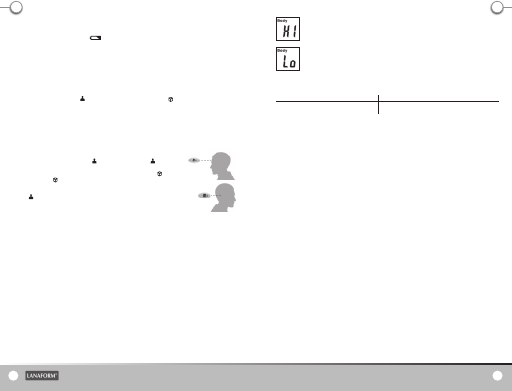
The screen displays the message “Hi”.
While using the thermometer, the message “Hi” may appear on the screen.
The temperature analysed is above the measurement range selected, or higher than 50°F (122°F) in “Body” mode or lower than 100°C
(212°F) in “Object/Surface” mode.
The screen displays the message “Lo”.
While using the thermometer, the message “Lo” may appear on the screen.
The temperature analysed is below the measurement range selected, either lower than 10°C (50°F) in “Body” mode or lower than 0°C
(32°F) in “Object/Surface” mode.
These messages are displayed under several circumstances. Please consult the list below for the major cases.
Reasons for displaying the “Lo” or “Hi” message Advice
Reading the temperature is hindered by a draught Make sure there are no draughts as this may disturb the infrared system.
Temperature di erence with the ambient temperature too high. Wait for 10 minutes before taking the body temperature.
WASTE MANAGEMENT
• All the packaging is composed of materials that pose no hazard for the environment and which can be disposed of at your local sorting centre to be
used as secondary raw materials. The cardboard may be disposed of in a paper recycling bin. The packaging lm must be taken to your local sorting and
recycling centre.
• When you have nished using the device, please dispose of it in an environmentally friendly way and in accordance with the law.
LIMITED WARRANTY
LANAFORM® guarantees this product against any material or manufacturing defect for a period of two years from the date of purchase, except in the
circumstances described below.
The LANAFORM® guarantee does not cover damage caused as a result of normal wear to this product. In addition, the guarantee covering this
LANAFORM® product does not cover damage caused by abusive or inappropriate or incorrect use, accidents, the use of unauthorized accessories, changes
made to the product or any other circumstance, of whatever sort, that is outside LANAFORM®’s control.
LANAFORM® may not be held liable for any type of circumstantial, indirect or speci c damage.
All implicit guarantees relating to the suitability of the product are limited to a period of two years from the initial date of purchase as long as a copy of
the proof of purchase can be supplied.
On receipt, LANAFORM® will repair or replace your appliance at its discretion and will return it to you. The guarantee is only valid through LANAFORM®’s
Service Centre®. Any attempt to maintain this product by a person other than LANAFORM®’s Service Centre will render this guarantee void.
DECLARATION OF EC 0499 COMPLIANCE
Medical Device Class IIa.
We, LANAFORM,
Declare that lot 001 of the LA090109 “Thermometer New Tech” medical device complies with European Directive 93/42/EC concerning medical devices
and its latest amendment 2007/47/EC concerning Appendix IV.
The Société Nationale de Certi cation et d’Homologation (SNCH) s.à.r.l. BP23, L-5201Sandweiler O ce: 2a, Kalchesbréck, L-1852 Luxembourg
organisation No. 0499, has veri ed the product (according to Appendix IV).
LANAFORM SA
Rue de la Légende 55, B-4141 Louveigné-Belgium
54
Thermometer « New Tech »
REPLACING THE BATTERIES
When the LCD screen displays “Lo + battery symbol” , the batteries are discharged. Open the battery cover located on the back of the
thermometer and change the batteries, being sure to comply with the polarity.
Never use rechargeable batteries, but single use batteries only.
Do not attempt to recharge non-rechargeable batteries.
Remove the batteries from the device if you do not intend using it for a long period.
In order to avoid all accidents or improper use, make sure you keep batteries out of the reach of children.
Please recycle used batteries in the appropriate containers. In order to avoid any environmental pollution, do not simply throw the batteries away.
SETTINGS
Choose the mode
Select the mode using the “MODE” button. The icon shows that you are using the “body” mode, and the icon refers to “object/surface” mode.
Choose the temperature unit
To choose the °C (Celsius) or °F (Fahrenheit) measurement unit, simultaneously press the “MODE” and “MEM” buttons for about 2 seconds. Then choose
the desired unit.
USE
Leave the device in the room for approximately 10 minutes before rst using it or after having inserted new batteries. (If the device has not been used
for a long time, it will test the ambient temperature and delay start-up for a second or two).
• For taking the temperature of a human being, use mode. The measurement range for mode:
10 to 50 °C (50 to 122°F).
• In order to measure the temperature of an object, food, liquid or the ambient temperature, use mode. The
measurement range for mode: 0 to 100°C (32 to 212°F).
• Then, aim at the forehead (see the illustration below for the positioning) from a distance of approximately 4 to 6
cm, press the measurement button, and the temperature will be displayed immediately.
• For the mode, if the temperature seems signi cantly di erent or if the forehead is sweaty, you can take the
temperature behind the ear lobe. Make sure that it is not obscured by hair, sweat, cosmetics or a hat.
“STORING DATA TO MEMORY” FUNCTION
Data is saved in the memory automatically each time a temperature is taken. Press the “MEM” button to display these temperature measurements.
The most recent measurement will be displayed in the centre of the LCD screen. To view the other measurements, continue to press the “MEM” button
successively. In order to reset this function, press this button for about 3 seconds.
MAINTENANCE AND CLEANING
• The glass protector that covers the lens is the most sensitive part and must be protected carefully.
• Clean the device with a cotton bud, slightly moistened with alcohol if needed.
• Do not clean the device with corrosive detergent.
• Use a soft dry cloth to clean the body of the thermometer. Never use an abrasive material and never submerge the thermometer in water or other liquids.
• Never expose the thermometer to extreme temperatures, damp, direct sunlight or impact.
• Do not touch the lens with your ngers.
• Do not dismantle the thermometer.
PROBLEM-SOLVING
Should you encounter one of the following problems while using your thermometer, please consult this guide to help you solve the problem. If the
problem persists please contact your reseller.
Version 01-01/09/2011
4 - 6cm
4 - 6cm
Lanaform Thermometer Handleid.indd 4-5 5/12/11 10:14



Присоединиться к беседе по данному изделию
Здесь вы можете поделиться тем, что думаете о Lanaform New Tech Термометр. Если у вас есть вопросы, сначала внимательно прочтите инструкцию. Запросить руководство можно с помощью контактной формы.