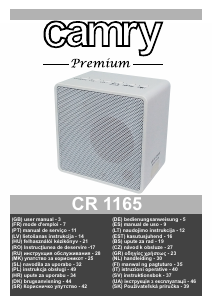
Руководство Camry CR 1179 Радиоприемник

Вам нужно руководство для вашего Camry CR 1179 Радиоприемник? Ниже вы можете бесплатно просмотреть и скачать PDF-инструкцию на русском языке. В настоящее время этот продукт имеет 2 часто задаваемых вопроса, 3 комментариев и имеет 2 голосов со средним рейтингом продукта 50/100. Если это не то руководство, которое вам нужно, свяжитесь с нами.

Ваше устройство неисправно, и в руководстве отсутствует решение? Перейдите в Repair Café для получения бесплатных ремонтных услуг.

Руководство

Loading…

4
device (RCD) in the power circuit, with residual current rating not more than 30 mA.
Contact professional electrician in this matter.
15. Avoid getting the radio wet.
16. The radio may only be wiped with a dry cloth. Do not use water or cleaning fluids.
17. Special discs for cleaning the CD player should be used regularly.
18. The radio should be kept in a dry room.
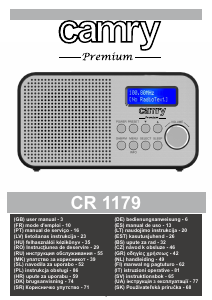
Device Description (Dab Radio):
1. LCD Display 2. Preset button 3. Previous / Scan 4. Next 5. Volume +/- Button 6. Sleep 7. Select / Snooze
8. Menu/Info 9. DAB/FM 10. Power ON/OFF 11. Micro-USB 12. 3.5mm Headphone Jack.
First Setup:
1. Make sure the device is fully charged. To do that connect the device by the Micro USB cable to a suitable power source.
2. Press and hold the Power button (10) for 2 seconds.
3. The first time the DAB Digital Radio
4. When your DAB Digital Radio is using the power adapter, press the POWER (10) button to switch 'on' and 'standby'. Unplug the
power adapter to turn off your Digital Radio completely.
5. When your DAB Digital Radio is using batteries, Press and hold the POWER (10) Button for 2 seconds or switch 'off'.s switch, it will
start up DAB mode. It will automatically scan for the available radio stations.
DAB/FM button
Switching to DAB/FM mode
1. The first time the DAB Digital Radio is switched, it will start up DAB mode.
2. If the device is in DAB mode, press the DAB/FM (9) button repeatedly until FM is shown on the display.
3. Once in FM mode, your DAB Digital Radio will tune to the start of the available FM range (87.50MHz) or the last FM station listed.
4. To manually change the FM frequency, make sure that you have not selected any other sub-menus. Turn the TU+/-( to change the
frequency by 0.05MHz.
Changing the DAB display information
1. If the DAB Digital Radio is in DAB mode, press MENU/INFO (8) button to select different info to show on the display, such as DLS
(Dynamic Label Segment), signal strength, PTY (Program Type), ensemble, frequency, signal quality, bit rate codec, time, date.
2. If the DAB Digital Radio is in FM mode, press the MENU/INFO (8) button to select different info to show on the display, such as radio
text, PTY (Program Type), PS (Program Service), stereo/mono, time, date.
DAB mode – choosing menu options
1. If the DAB Digital Radio is in DAB mode, press and hold MENU/INFO (8) button to enter the menu list to Press the Next/
Previous(3,4) button to select the option through the list of menu. Then, stop at your preferred option and Push the SELECT (7)
button to confirm. The menu options are: full scan, manual tune, DRC, prune, system.
2. Full scan – under menu list, press the Next/ Previous (3,4) button to select “Full scan“ through the list of menu, Push SELECT (7)
button to confirm and full scan starts automatically to Once a scan is completed, the radio returns to play the previously-selected
station or first station on the station list.
Note: if no radio station found, it shows “No DAB Station”. For better reception, extend the antenna or do the full scan again in another
place.
3. Manual tune – as well as the normal method of scanning, you can also manually tune to a particular channel/frequency. This can be
useful for adjusting your antenna to achieve the best possible reception and scanning a particular channel to update the station list.
Under the menu list, press the Next/Previous (3,4) button to select “Manual tune” through the list of menu, Push Select (7) button to
confirm. Then press the Next/ Previous (3,4) button to select a particular channel/frequency and then Push SELECT (7) button to
confirm the setting to The display shows a live indication of the received signal strength on the selected frequency. Adjustments to
your antenna will be manifested in the received signal strength displayed.
5. Prune – this removes all invalid stations indicated in the station list with a '?' in front of the station name. Under menu list, press the
Next/ Previous(3,4) button to select “Prune” through the list of menu, Push SELECT(7) button to confirm to Then press the Next/
Previous(3,4) button to select <Yes>, and Push SELECT(7) button to confirm
6.0. Time – if there are any DAB+ radio signal, the machine will automatically update the time, there is no signal, can also be set
manually.
*Set Time/Date: set hour / set minute / set month / set date>set year > saved
*Auto-update options: update from Any / update from DAB/update from FM
/ no update
*Set 12/24 hour: 12hour/24hour
*Set date format: DD-MM-YYYY/MM-DD-YYYY Cycle through Time menu by Push the SELECT (7) button, select a particular option,
and Push the SELECT (7) button changes.
6.1. Backlight – this radio display has a backlight which can be adjustable. You can select the time out of the display backlight of your
radio. Under the system menu, press the Next/Previous (3,4) button to select “Backlight” through the list of menu, Push the SELECT
Загрузить руководство на русском (PDF, 4.41 MB)
(Помните о необходимости охраны окружающей среды и распечатывайте настоящее руководство только в том случае, если это действительно необходимо)

Loading…

Рейтинг

Сообщите нам, что вы думаете о Camry CR 1179 Радиоприемник, оставив оценку продукта. Хотите поделиться вашими впечатлениями от данного изделия или задать вопрос? Вы можете оставить комментарий в нижней части страницы.
Вы довольны Camry CR 1179 Радиоприемник?
Да Нет
50%
50%
2 голоса

Присоединиться к беседе по данному изделию

Здесь вы можете поделиться тем, что думаете о Camry CR 1179 Радиоприемник. Если у вас есть вопросы, сначала внимательно прочтите инструкцию. Запросить руководство можно с помощью контактной формы.

Louis COZETTE 21-08-2024
Я не знаю, как запрограммировать время и дату в режиме FM.

ответить | Это было полезно (0) (Переведено Google)
Louis COZETTE 07-09-2024
Не могу поставить время и дату. в режиме FM Пожалуйста, дайте мне описание клавиш, которые можно использовать для выполнения этих операций.

ответить | Это было полезно (0) (Переведено Google)
Louis COZETTE 07-09-2024
Какие клавиши нажимать, чтобы установить время и дату. Пожалуйста, дайте мне как можно более подробное описание.

ответить | Это было полезно (0) (Переведено Google)

Подробнее об этом руководстве

Мы понимаем, что приятно иметь бумажное руководство для вашего Camry CR 1179 Радиоприемник. Вы всегда можете скачать инструкцию с нашего сайта и распечатать самостоятельно. Если вы хотите получить оригинальное руководство, мы рекомендуем вам связаться с Camry. Возможно, они смогут предоставить оригинальное руководство. Вы ищете руководство для вашего Camry CR 1179 Радиоприемник на другом языке? Выберите предпочитаемый язык на нашей домашней странице и найдите номер модели, чтобы узнать, есть ли она у нас в наличии.

Технические характеристики

Бренд Camry
Модель CR 1179
Категория Радиоприемники
Тип файла PDF
Размер файла 4.41 MB

Все инструкции для Camry Радиоприемники
Больше руководств Радиоприемники

Часто задаваемые вопросы о Camry CR 1179 Радиоприемник

Наша служба поддержки выполняет поиск полезной информации по изделиям и отвечает на часто задаваемые вопросы. Если вы заметили неточность в наших часто задаваемых вопросах, сообщите нам об этом с помощью нашей контактной формы.

Что такое DAB +? Проверенный

DAB + является преемником сигнала FM и расшифровывается как Digital Audio Broadcasting. Это цифровой сигнал, который позволяет использовать больше каналов в пределах одной полосы пропускания и упрощает переключение между каналами.

Это было полезно (304) Читать далее

В чем разница между FM и AM? Проверенный

FM и AM - это формы модуляции, используемые для передачи сигнала. FM - это частотная модуляция, а AM - амплитудная модуляция. AM - самая старая форма модуляции. Самая большая разница в том, что сигнал FM намного сильнее сигнала AM.

Это было полезно (244) Читать далее
Руководство Camry CR 1179 Радиоприемник

Сопутствующие товары

Связанные категории

×
Download